
From DVD players, Home Theatres to Blu-ray players, entertainment has taken a leap from one form to another. In fact, people even watch movies on their PCs. We don’t mind to sacrifice the sheer pleasure of watching our favourites on our Full HD LCD TVs probably for the reason that we don’t want to convert the downloaded movies from one format to another or burn DVDs from them.
But with the influx of hard-drive based media players, it has become very easy to watch your HD-rip collection on a television set. All you need to do is to copy the library on the hard-drive and hit play. If you recollect we also reviewed the WD TV Live sometime earlier that lets you play movies from the attached portable USB drives and memory cards.
The latest addition to the WD TV family is WD TV Live Hub that adds one of the most lacked features in WD TV – an integrated hard-drive. The Live Hub now comes with a 2.5-inch 1TB hard-drive that allows you to store your videos on the built-in hard drive, eliminating the need to attach external storage every time a you want to see a movie.
We took the device for a quick test and this is what we found.
Package Contents:

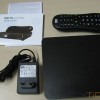
WD TV Live Hub has a simple packaging consisting of the Live Hub unit, Install Guide, AC adapter and a remote control with batteries. Disappointingly, WD has decided not to bundle any video cable, which is kind of surprising. Not bundling HDMI or Component AV cable is understandable but giving a standard Composite AV cable woudln’t hurt. Any video cable needs to be bought separately.
First Impressions:

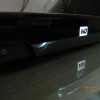
It seems WD gave a special thought to Live Hub’s design. Not only this is the first WD TV media player to come with an integrated Hard-drive but WD has also managed it to make really thin. When you compare with the previous generations, the set-top box akin WD TV Live Hub is just 1.3-inch tall and 7.8-inches wide and weighs just over half a kilogram. The unit has a brushed aluminum finish on the top with the front hosting a glossy surface with white-LED-equipped WD logo acting as a status indicator.
One missing feature I pointed out during WD TV Live review was the lack of physical buttons on the main unit. Well, it seems they’ve heard us but the only inclusion of the physical button is Power button located at the bottom left. Functioning of the media player is still dependent on the remote control.

As for the ports, there are two USB ports – one at the front and another at the back, one HDMI 1.4 port, Component ports, Composite ports, Ethernet jack, Optical Audio and power slot.
User Interface and Remote Control:

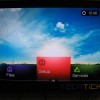
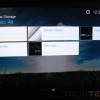
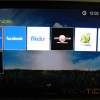
WD TV Live Hub’s user interface has got a major overhaul as well. The UI dubbed as Mochi is definitely faster and more responsive than what we’ve seen in earlier WD TVs. The bottom carousel gives a clear view of the main menu whereas the inside menus are customizable according to user preferences. A user can sort out the content according to the ratings, genre, playlist, alphabetically and more. There are different views for the content as well, which supports cover art view, file view and live preview. All this can be done with the help of buttons on the remote control.

As I said, WD TV Live Hub’s remote control is as important as the unit itself. WD has adopted a new bigger remote with dedicated keys for most functions. The alphanumeric keyboard on the remote can be used to say – skip to a particular part in a movie or use the keys to type in status messages on your Facebook etc.
Performance:
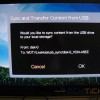
WD TV has developed a reputation of supporting variety of multimedia formats and the Live Hub is no exception. Users can copy the content by attaching an external USB drive, from the network or from a Network-Attached Storage (NAS). The device played every file we threw at it. You’ll be excited to know that this baby supports full HD playback, .MKV format support, Dolby Digital, DTS, FLAC playback, subtitles support.
Supported formats:
Video – AVI (Xvid, AVC, MPEG1/2/4), MPG/MPEG, VOB, MKV (h.264, x.264, AVC, MPEG1/2/4, VC-1), TS/TP/M2T (MPEG1/2/4, AVC, VC-1), MP4/MOV (MPEG4, h.264), M2TS, WMV9
Photo – JPEG, GIF, TIF/TIFF, BMP, PNG
Audio – MP3, WAV/PCM/LPCM, WMA, AAC, FLAC, MKA, AIF/AIFF, OGG, Dolby Digital, DTS
Playlist – PLS, M3U, WPL
Subtitle – SRT, ASS, SSA, SUB, SMI

Live Hub also supports few services like Accuweather, Facebook, Flickr, Live365.com, Mediafly, Pandora and YouTube. Since all these require an internet connection, a user needs to hook the device with a wired connection or use a compatible wireless USB dongle.

Although all services doesn’t work in India, Facebook, Flickr, YouTube, Live365 worked flawlessly. In fact, the WD TV Live Hub boasts a tight integration of Facebook that allows users to update their status, comment and upload their pictures directly to their account.
Conclusion:
The WD TV Live Hub brings three important things to the table – media streaming capabilities, integrated storage and ability to function as a NAS at an affordable price. Of course, no inclusion of any video cable or missing built-in Wi-Fi is a dampener but it’s wide multimedia format support and ease of use makes up for it.
It retails in India for Rs.9999.
Rating: 
Pros: 1TB HDD, User Interface, Multimedia support
Cons: No bundled cables, No built-in Wi-Fi






Leave a Reply